1.0 THIS IS WHAT STORAGE SHOULD FEEL LIKE
1.1 Intro

— Storage shouldn't be a compromise. For years, the best option for makers was a row of identical bins, a pegboard, or a tackle box that was never quite right. We built Vault because we got tired of working around our tools instead of with them.
1.2 The Last Storage System You'll Need

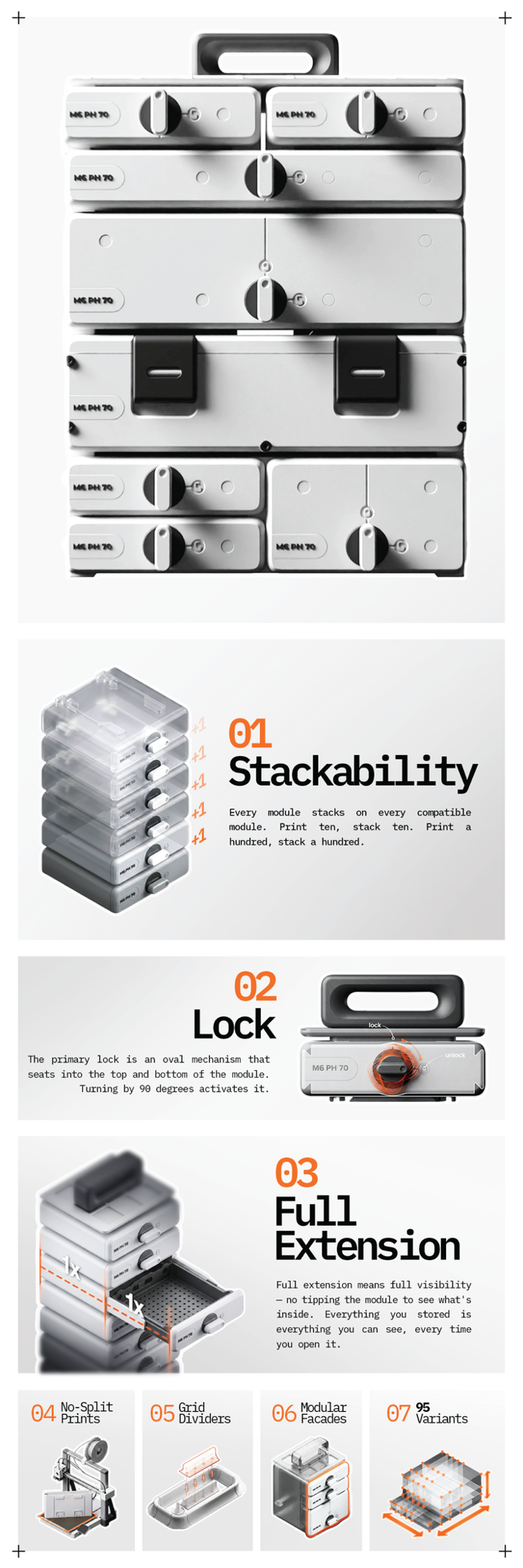
—This is a modular 3D-printed storage system with 95 module sizes, a mechanical locking system, full- extension drawers, and Gridfinity compatibility built in from the ground up. Everything you see here was designed, printed, tested, and refined in our own workshop — countless iterations, every mechanism physically proven before it made the final cut.
2.0 WHY CHOOSE VAULT

2.1 Tame The Chaos

—The alternative storage solutions haven't changed in years: uniform bins in fixed sizes, pegboards that don't travel, tackle boxes with no labeling or logic. They all share the same flaw — built for a static workspace, when workshops never stay static.
—Vault is built for how projects actually behave: growing, shifting, finishing, starting again. The modularity is structural, not cosmetic — width groups nest, heights combine in every direction, drawers and sustainers mix freely. When a project wraps, Vault doesn't go obsolete — it reconfigures for the next build. And since it's printed on demand, you never buy more than you need, and can always print more when you do.
—No other system matches this combination of scale, flexibility, labeling, and Gridfinity-compatible precision. Vault isn't the best option — it's the only one built this way.
2.2 Fits Any Project

—A single S module with one drawer. Or a floor-to-ceiling tower of XL modules holding dozens of sorted compartments. Vault works at both ends and everywhere between. Starting a small repair job? Print two modules and a handle. Running a full product development cycle? The system scales to meet it.
2.3 Grow As You Go

—You don't have to plan the whole system before you start. Print one module for the current project. When the next phase begins, print another. When the project doubles in scope, stack two more on top. The system you have today is already compatible with everything you'll print tomorrow. No retrofitting.
2.4 Infinite Repurpose

Storage shouldn't retire when a project does. With Vault, finished projects don't leave behind a pile of dedicated bins that no longer make sense — they leave behind modules ready to be relabeled and reassigned to whatever comes next.
Old drawers slot into new frames. New modules connect to existing stacks.
2.5 Who Is Vault For?

Makers who need to track hundreds of parts across overlapping builds.
Mechanics and electricians who want their workshop sorted and portable. Painters and crafters who switch between projects and hate losing small items.
If you have things that need to be stored and found again — Vault was built for you.
2.6 Color Your Way

Every module prints in whatever filament you load. That means the system doesn't have to look the same for every project — or every person. Use one color for your electronics work, another for woodworking. Color-code by project, by category, by urgency, or purely by preference. Or mix colors across a single tower.
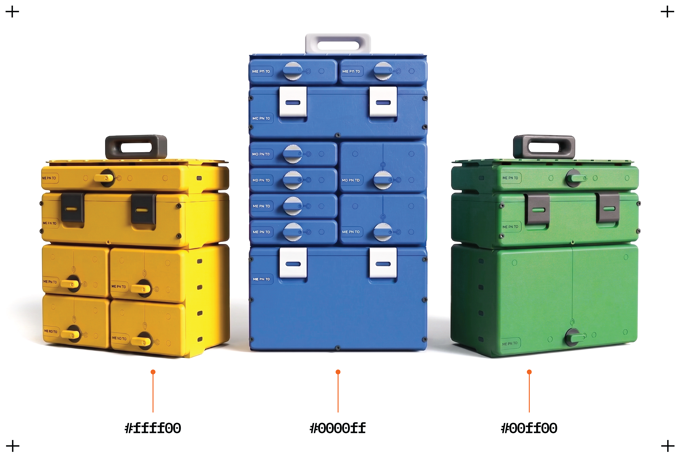
Mix, match, and customize tower colors to instantly organize different projects at a single glance
3.0 TOOLS ANATOMY

3.1 Exploded Diagram

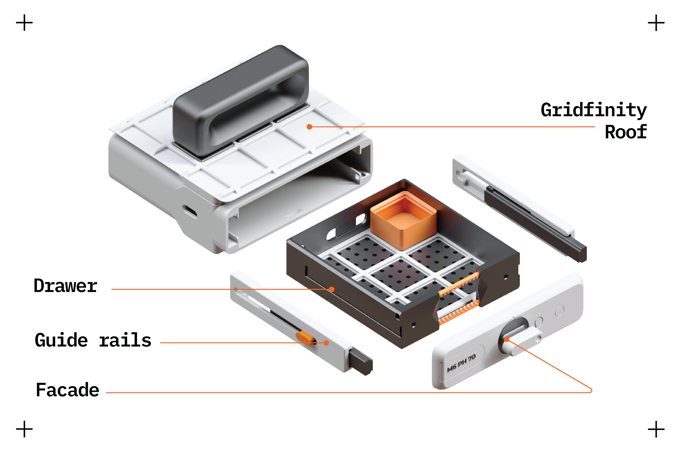
The frame requires four bolts on the facade. Everything else is 3D-printed: the runners, the latch mechanism, the oval lock, the geared rails. Parts are designed with manual break-away supports that snap off cleanly in one motion, and wall thicknesses are reduced wherever load-bearing isn't needed. The system is engineered to use as little material as possible while remaining rigid under real workshop conditions.
3.2 Gridfinity Compatibility

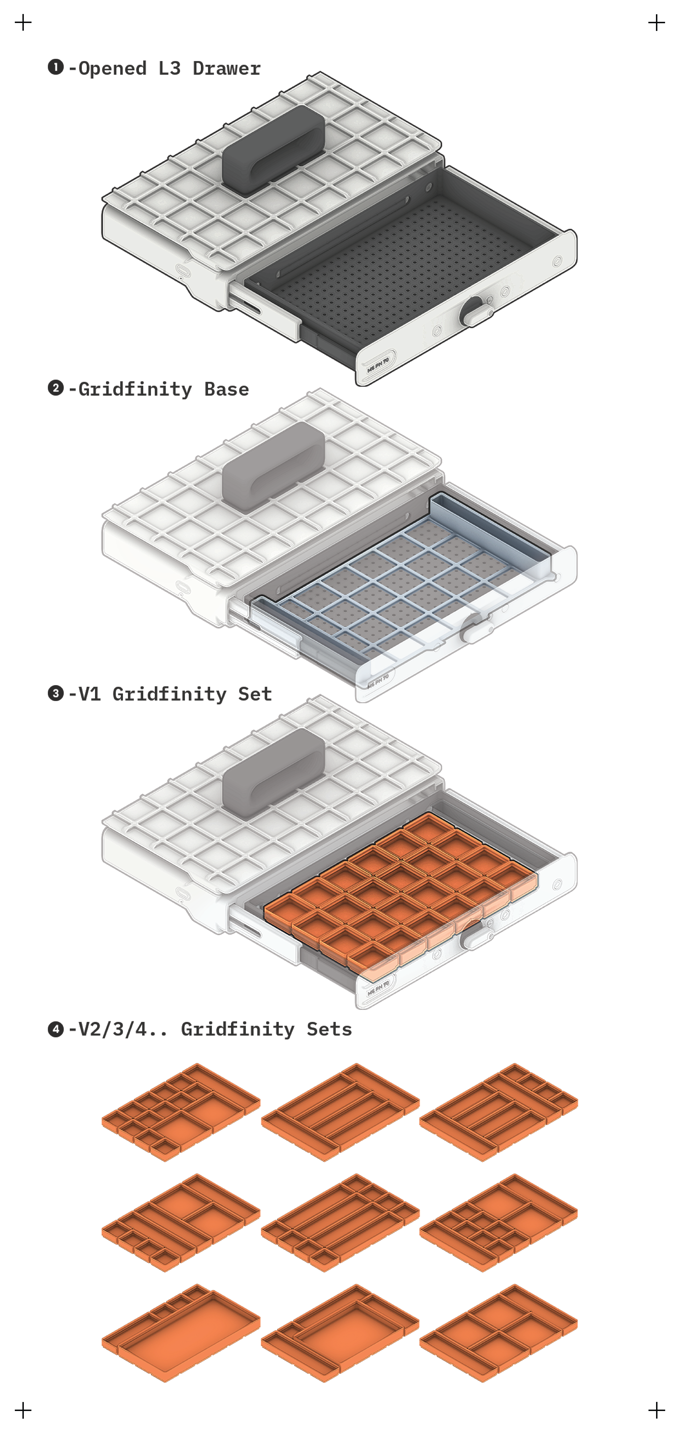
Vault is built around the 42mm Gridfinity standard — the most widely adopted organizational grid in the maker community. Every module interior is dimensioned so Gridfinity inserts drop straight in without cutting, shimming, or adapting. S fits 3 units wide, M fits 5, L fits 6, XL fits 9. Depth is available in five variants, each with a 42mm progression.
3.3 1+2+4

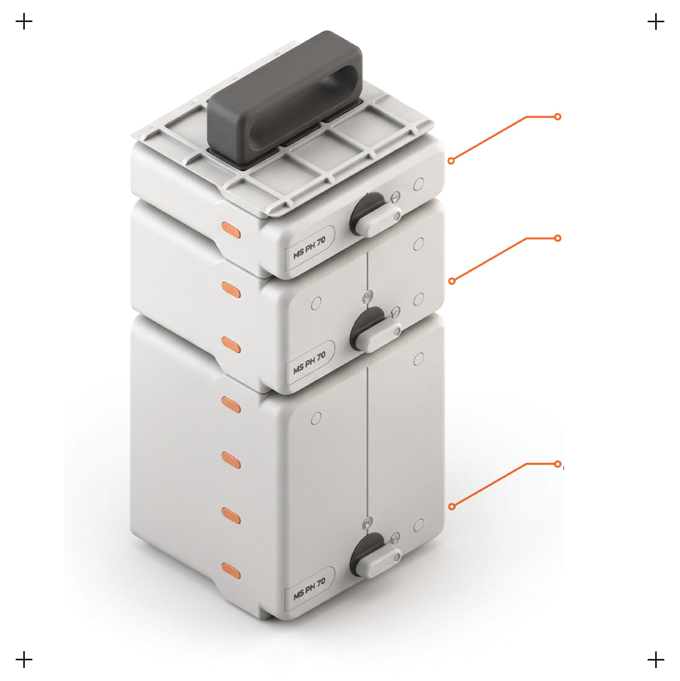
Vault uses three floor heights: 1, 2, and 4. No three. The reason is simple — every combination is divisible by two, which means any height can be filled with units of the sizes below it without remainder or awkward gaps. A 4-floor frame fits one 4F unit, two 2F units, four 1F units, or any mix of the above.
4.0 TOP 12 FEATURES

4.1 Modularity

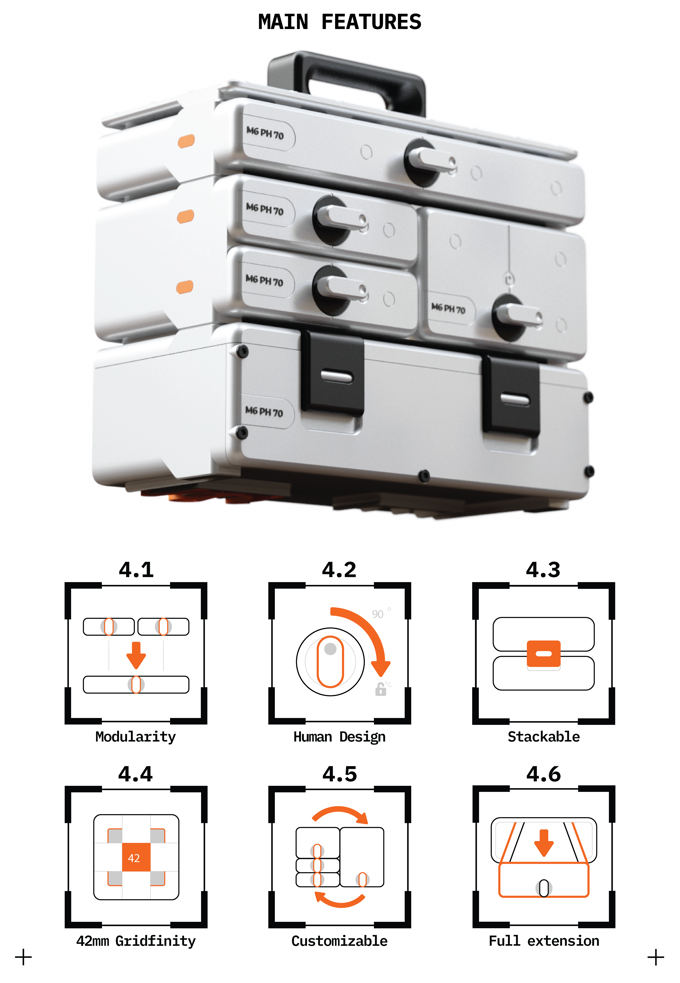
L is exactly the width of two S modules. XL is the width of S+M. That means modules align cleanly when stacked across groups, and everything is cross-compatible. Add height floors into the same logic — every module comes in 1F, 2F, and 4F One coherent grid, expressed in plastic.
4.2 Human Design

Vault was designed to feel right before looking right. The lock clicks with a resistance that tells you it's engaged. The drawers smoothly slide which tells you the runners are set correctly. Good engineering is invisible. Good design makes sure you notice the result even when you don't notice the work.
4.3 Stackability

Every module stacks on every compatible module. Print ten, stack ten. Print a hundred, stack a hundred. The latch-and-stopper mechanism seats firmly without forcing and releases cleanly without wobbling. No practical upper limit. No loss of stability as the tower grows.
4.4 Gridfinity

Every Vault module interior is dimensioned around the 42mm Gridfinity standard. Your existing inserts drop straight in. If you're new to Gridfinity, you're entering the most supported organizational ecosystem in the maker community — and Vault gives you the best possible home for it.
4.5 Customizable Facades

A 4F module can be fronted with one 4F facade, two 2F facades, four 1F facades, or any mix. Each facade has its own lock, label slot, and handle — independently accessible compartments in a single frame. That means a single large module can hold multiple independently accessible compartments, each with its own identity.
4.6 Full Extension Drawers

Every drawer extends completely out of the module. That's a mechanical choice, not a default — it required designing special runner system. Full extension means full visibility — no tipping the module to see what's inside. Everything you stored is everything you can see, every time you open it.
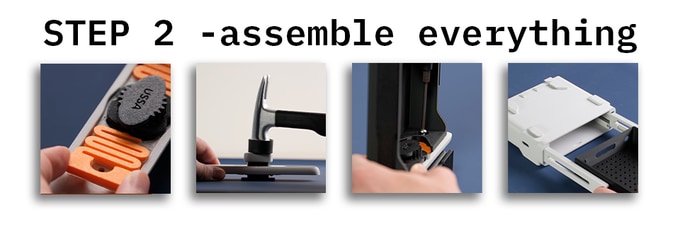
Each Vault module connects to the next, using integrated latch mechanism. These latch connectors keep modules vertically locked, keeping the entire stack rigid while carrying. When it’s time to work, drawers slide smoothly and stay aligned without any wobble.
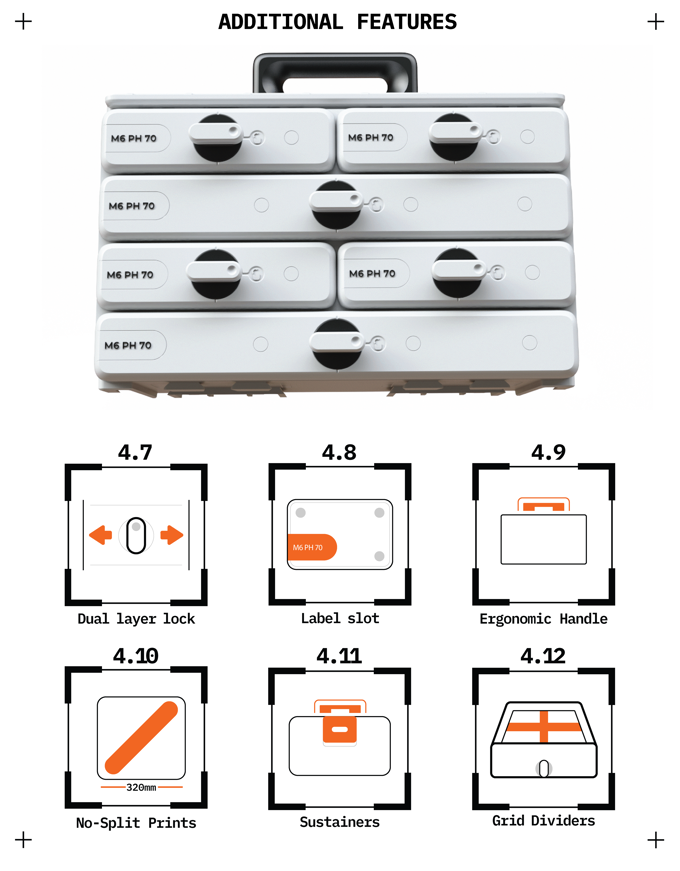
4.7 Dual-Layer Locks

The primary lock is an oval mechanism that seats into the top and bottom of the module. Turning by 90 degrees activates it.
In complex configurations — a 4F module holding four individual 1F units, for example — oval lock is not enough, that is why there is a second layer, geared rails that extend into module side walls.
4.8 Labeling System

Every facade has a nameplate slot. Print it with the drawer or swap it when the contents change. The system assumes you'll reorganize eventually, so the labeling is designed to be as easy as possible.
Customize the text directly in your slicer — no label maker, no handwriting.
4.9 The Handle

The ergonomics were refined over multiple iterations to feel right in the hand during a real carry, not just when sitting on a bench.
4.10 No-Split Prints

Every part prints whole. No splitting, no gluing, no bond lines that fail under load. Every file comes pre-oriented for the best possible result. Open the file, slice it, use it.
4.11 Sustainers

Not everything belongs in a drawer. Sustainers are hinged-lid modules that share the same dimensions and conn ections as drawers, so they can be stacked together. The hinge removes entirely for full open access.
4.12 Grid Dividers

Printed dividers slot into a 10.5mm grid on every drawer floor.
Partition into two zones or twelve. Fix bulky items, section off small parts, fit irregular shapes.
When the project changes, pull the dividers out and put them back differently. No cutting, no adhesive, no permanent decisions.
5.0 TECHNICAL INFORMATION

5.1 Sizes

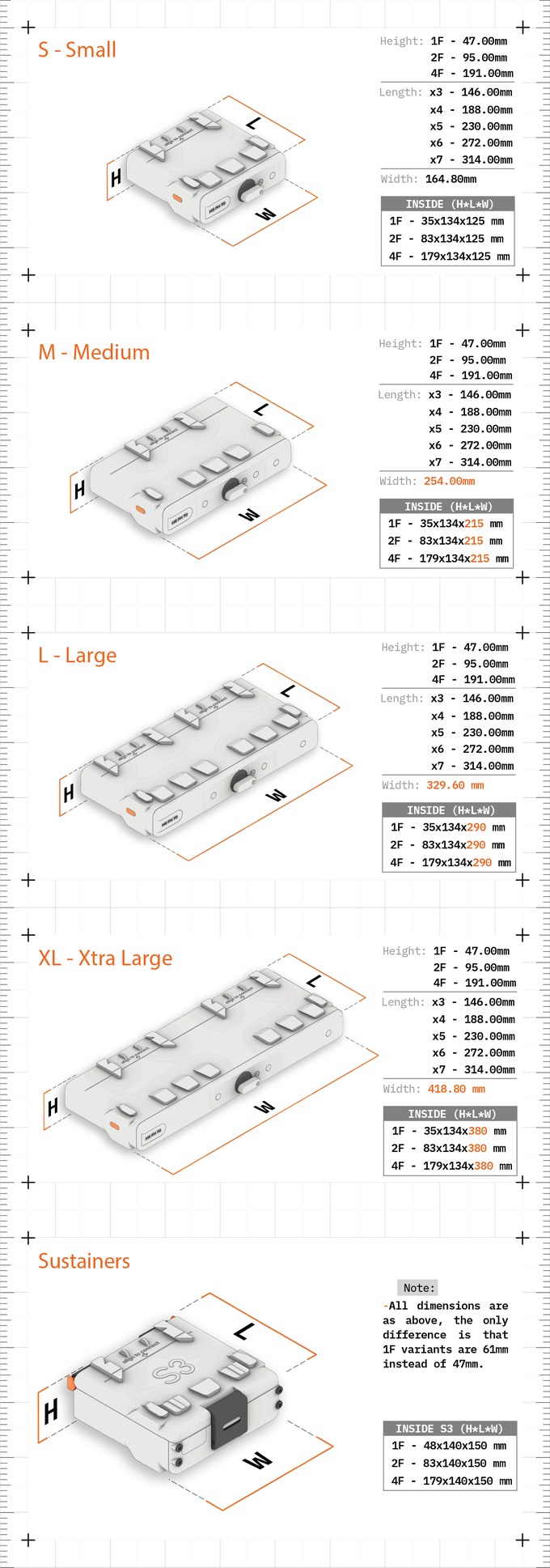
The system spans the full range of consumer printers, from the A1 Mini up to the H2S. Whatever machine you're running, there's a module sized for its build plate. The largest — the full-depth XL7 modules — run up to four days straight. That's not a warning; it's a measure of how substantial the system gets at the top end.
5.2 Print Time / Material Usage

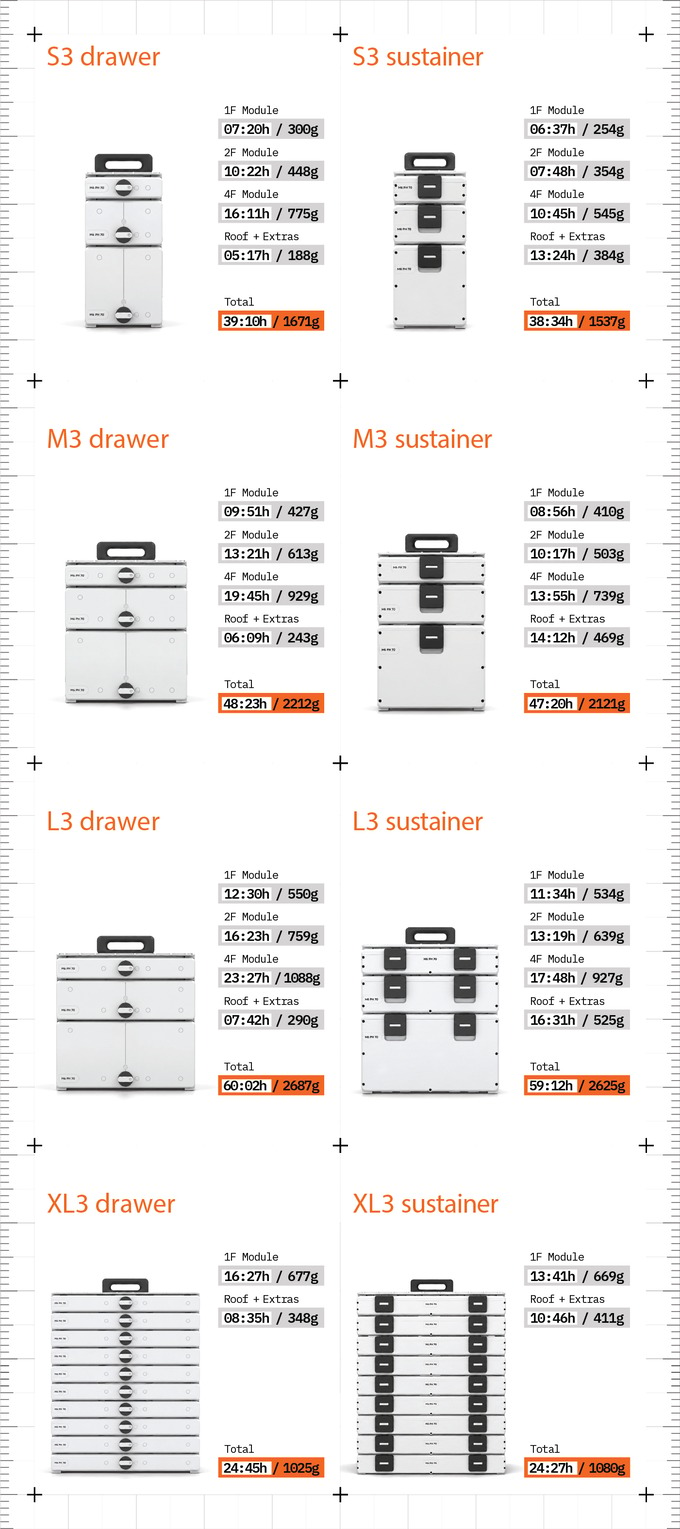
Print time and filament weight estimates are published for every size and configuration so you can plan before you commit. Wall thicknesses are reduced wherever the geometry allows, and unnecessary structure is eliminated throughout — so you're not wasting material on parts that don't need it. Faster prints, less filament, same rigidity where it counts.
REQUIRED HARDWARE:
M4 Bolts 14-20MM (Facades)
M6 Bolts 40-60MM (Roof Handle)
6.0 DESIGN BACKGROUND

6.1 How It Started

Vault didn't start as a product. It started as a recurring frustration. We were deep into another project — parts everywhere, no good way to sort or label them. We looked at what existed. Bins. Pegboards. Tackle boxes. Gridfinity trays with no enclosure. None of it scaled. None of it adapted. None of it could be repurposed when the project was done.
So we started designing. The first version solved the immediate problem badly. The next version solved it better. A hundred iterations later, we had something that solved it well enough to use every day — and complicated enough mechanically that it took genuine engineering to get right.
The oval-profile lock alone went through more generations than we'd like to admit. So did the runner system, the latch geometry, the facade clip, and the support strategy. Each one was right when it stopped needing to change.
6.2 Archive of Prototypes

Every mechanism in Vault exists in physical form before it exists in the files you'll download. The springs, latches, runners, the locks, the geared rails, the fence dividers — all of them went through multiple generations of physical prototypes before the geometry was finalized.
Check out our in-depth video on YouTube about design process and all of it's features:
We kept the failed versions. There's a shelf of them. They're useful to look at because they show exactly what didn't work. When we say 100+ iterations, we mean printed parts on a real printer, assembled by hand, tested under load, and revised when something wasn't right. The files you receive are the end of that process — not the beginning of yours.
Commercial License
All commercial licenses are annual licenses. You have to renew a license every year. The commercial licenses are to sell 3D prints of the digital files. Commercial license holders are not permitted to distribute the digital files or use them for mass production injection molding or any other type of mass production. The commercial license is only for selling 3D prints of the digital files.
The Commercial License is valid for selling VAULT online, physical shops, conventions, events etc.
All commercial license holders will receive an individual registered commercial license that they must display wherever they sell their products (this is typically done in the listing).
All commercial license holders will also be provided with a media folder that contains all the professional photos, videos, renders and illustrations! Our goal is to make it as easy as possible for our commercial backers.
Taxes - Taxes Charged in the Pledge Manager!!
Please note, with Kickstarters new update and pledge management system, backers are responsible to pay sales tax and any applicable local taxes during the pledge management process! This process is new and not something that the creators have any control over!!
Our products are digital files. Since we are not shipping you a physical product, you are not paying for shipping in the pledge manager, which makes the sales taxes seem like a random charge. We sincerely apologize in advance for how this process can be annoying or confusing. We do not have any control over the sales tax process. Kickstarter is required to collect and remit the taxes.
If you are located in the USA, only some states require you to pay sales tax on digital products, if you are in one of these states, during the pledge manager you will be required to pay the sales tax (it is usually a very small amount).
If you are located elsewhere, you may be required to pay your local applicable taxes like VAT or GST for example.
Please note that as the creator we do not have the option to include the sales tax in your pledge or we would. Please also note that the sales tax gets collected by Kickstarter and directly remitted to the corresponding tax authorities, it does not go to the creators. If you have any questions about the sales tax collection, please ask the Kickstarter team.
Disclaimers
- This is a digital file campaign - there are no physical products being sold.
- The files will be available for purchase after the campaign at a higher price, we reward our backer community with the biggest discount available!
- It is the backers responsibility to know how to use a 3D printer to print the files. We have made the process very beginner friendly!
- You have the entire duration of the campaign to cancel your pledge. There are no refunds once the campaign is over.
Reprodução integral da seção “Story” da campanha para estudo interno. Os GIFs originais foram convertidos em MP4 silenciosos em loop. Fonte: kickstarter.com/projects/ussa/vault-modular-stacking-toolbox-system.